Request ingredients
Kitchen and stock teams raise requests for the ingredients they need.
Kitchen & storage Book a demo
QUANTA FOR RESTAURANTS
Manage orders, track ingredients through recipes, and review sales and costs in one system.
From US$19 / month per outlet.
See online reservations, the POS, and back office in use.
Watch on YouTubePRODUCT
Select a view to explore the interface.
Open any screenshot for a closer look.
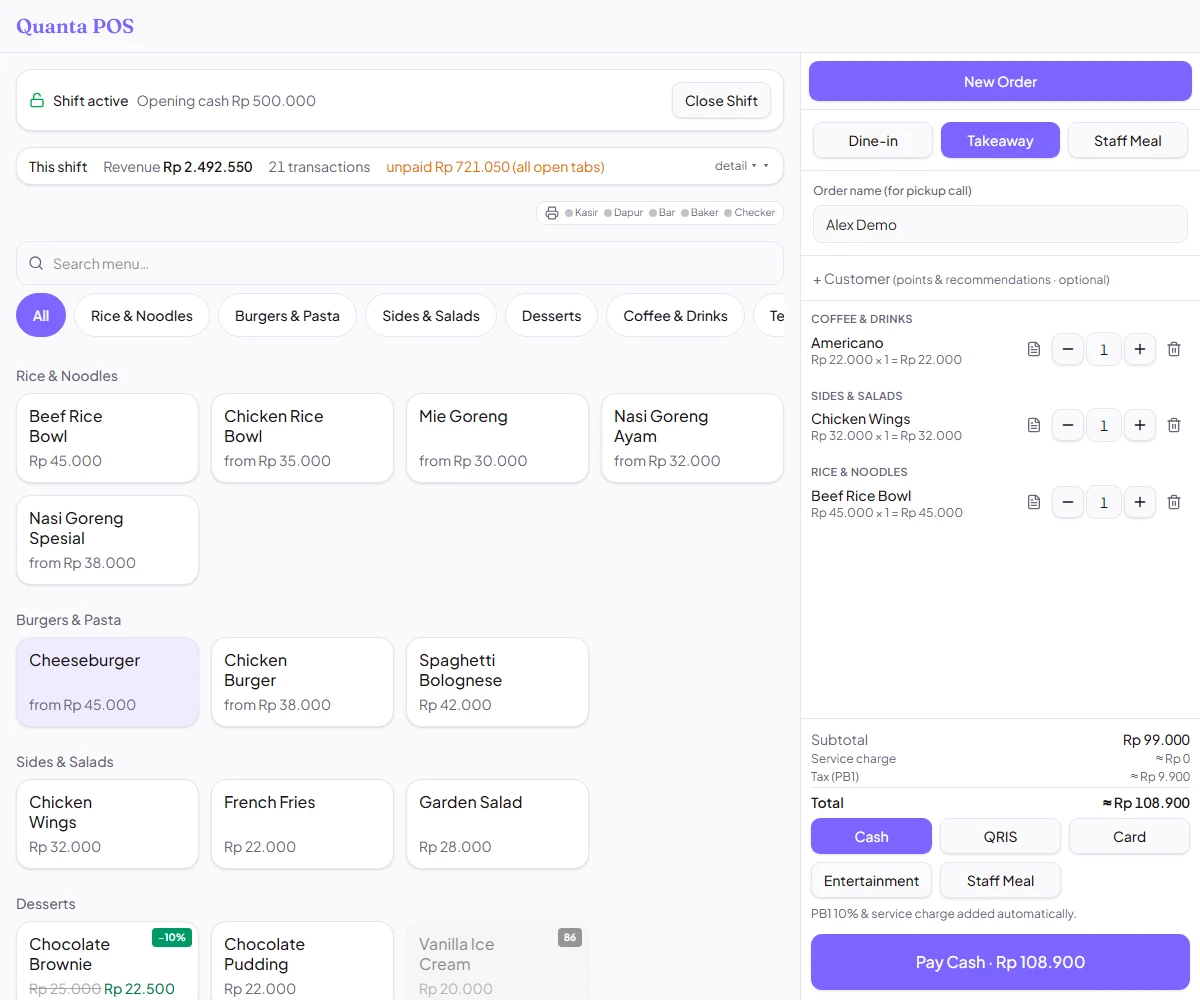
Take dine-in and takeaway orders, add variants, split bills, and record cash, card, or QRIS payments.
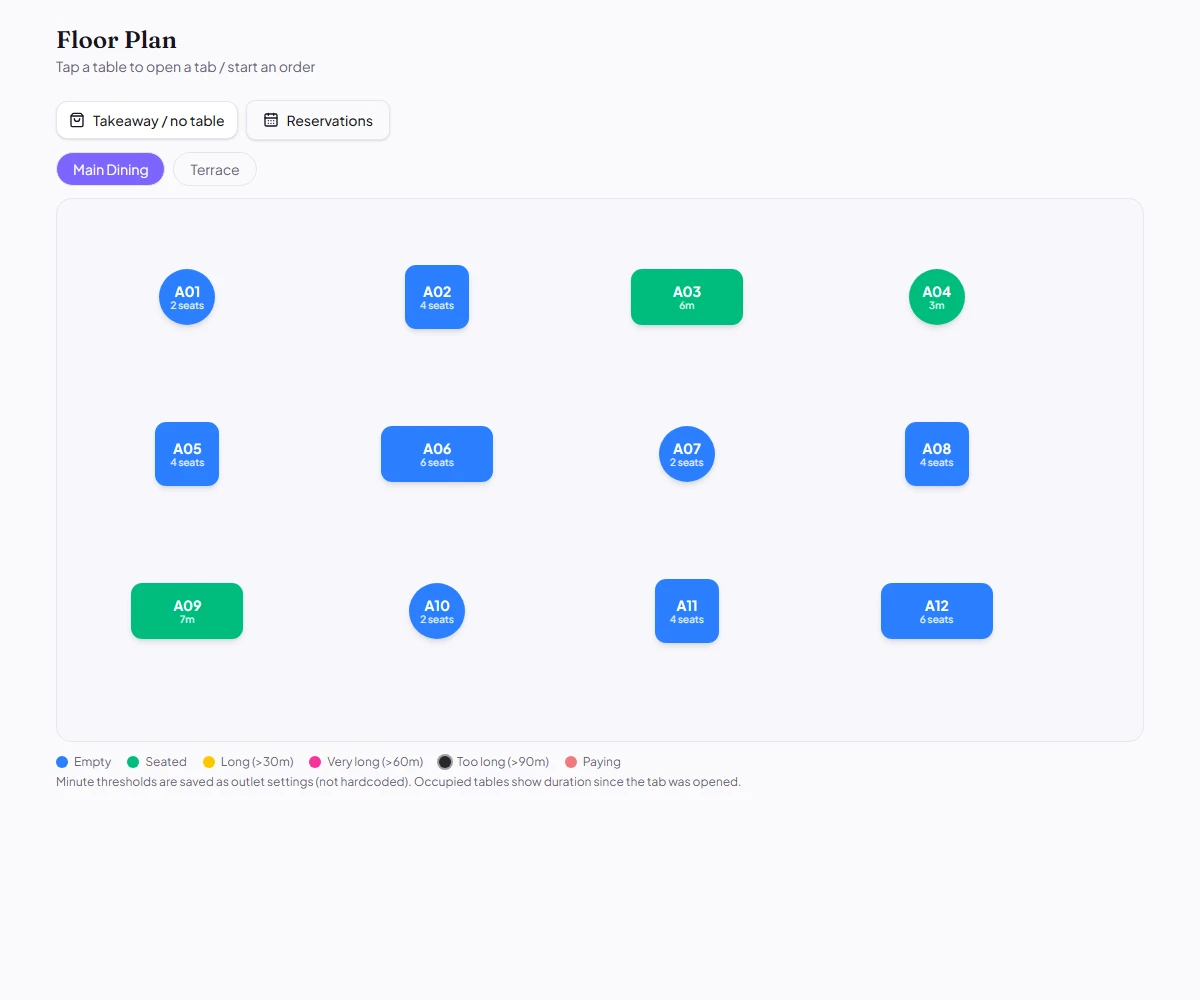
Open a table’s tab from the floor plan. See occupancy, elapsed time, and which tables need attention.
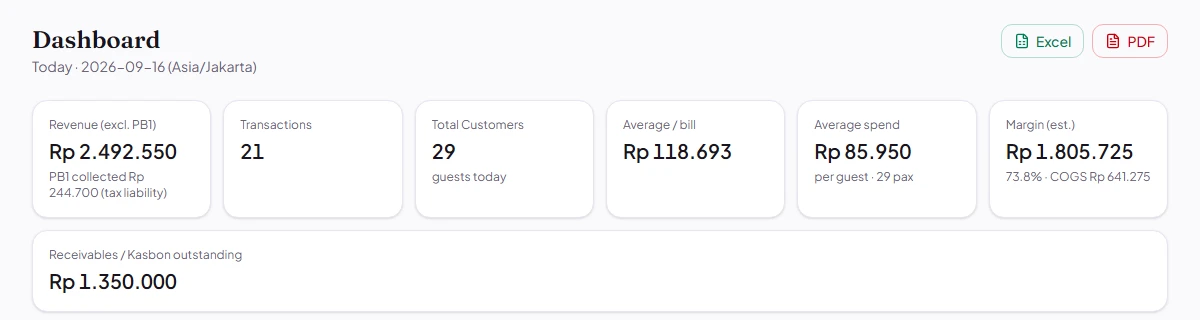
Review daily sales and activity in one overview. Use the picture to help set your team’s priorities.
Explore Quanta’s interface using example restaurant data. Menu names and figures are for demonstration only.
INVENTORY & FOOD COSTS
Manage recipes, ingredient inventory, and food costs in Quanta. Sales update stock records, while recorded ingredient costs feed your reports.
Explore business overviewSet up recipes to connect sold items to ingredients.
Build recipes with quantities, prep batches, and nested sub-recipes.
Deduct recipe ingredients from their stock locations as sales are recorded.
Use recorded ingredient costs to understand cost of goods and gross margin.
Gross margin excludes wages, rent, and other operating expenses.
PURCHASING
Track requests, approvals, deliveries, and invoices.
Each step has its own record in Quanta.
Kitchen and stock teams raise requests for the ingredients they need.
Kitchen & storageTurn requests into supplier orders with an approval trail.
Purchasing & accountingRecord goods received and bring incoming ingredients into stock.
Storage teamMatch the invoice against the purchase order and goods receipt.
AccountingMoving stock between rooms? Store requests handle internal transfers separately from supplier purchases.
TEAM ACCESS
Tables, orders, and bills. Access follows the role.
Kitchen display tickets, preparation stages, and item availability.
Ingredient counts, stock transfers, and supplier orders.
Sales, menu margins, cash history, cost of goods, and P&L.
PLANS & PRICING
Monthly and annual subscriptions per outlet, in US dollars.
Talk with us about your POS, inventory, and purchasing needs.
For daily counter service, table management, and sales tracking.
US$19 / month
or US$190 / year
Per outlet. Annual plan billed yearly.
Connect service to the kitchen, ingredient stock, and food costs.
US$29 / month
or US$290 / year
Per outlet. Annual plan billed yearly.
Manage supplier purchasing and restaurant finances alongside service.
US$49 / month
or US$490 / year
Per outlet. Annual plan billed yearly.
Discuss your restaurant setup, team structure, and operational requirements with us.
Custom
Custom pricing for multiple outlets.
Not sure which plan fits? Tell us how your team handles orders, ingredient stock, and reporting so we can discuss the right setup.
GETTING STARTED
Orders connect to the floor plan, kitchen display, recipe-based stock, and reports. Purchasing and receiving help keep the same ingredient inventory supplied.
Let us know when booking. Tell us about your restaurant and how you work on WhatsApp so we can tailor the conversation to your needs.
The POS supports cash, card, and QRIS payment recording. Printer connections and payment integrations depend on your setup. Tell us about your existing equipment so we can confirm compatibility and provide a quote.
The screenshots and figures on this page illustrate the product. Gross margin is the selling price less ingredient costs, before wages, rent, utilities, and other operating expenses.
BOOK A DEMO
Tell us about your current POS, stock process, and equipment.
We can walk through the features relevant to your team.